Briefs
Create detailed content briefs with research
Briefs
A brief is a detailed specification for a piece of content. It captures what you're writing, who it's for, and what it should cover.
What is a brief?
A brief is your contract with yourself about what you'll write:
- The topic and angle
- Target audience
- Key points to cover
- Sources and research
- Word count and format
Briefs become articles.
Creating a brief
From the header Create menu
- Open the Create menu in the workspace header
- Select Briefs
- Choose how to create the brief:
- Manually — Enter brief details yourself
- Use SEO Optimisation — Create a brief based on keywords and competitor analysis
From the sidebar
- Go to Create → Briefs in the sidebar
- Click Create brief
- Choose how to create the brief:
- Manually — Enter brief details yourself
- Use SEO Optimisation — Create a brief based on keywords and competitor analysis
Create manually
- Select the manual option
- Enter:
- Title: Working title for the content
- Plan: Which plan this belongs to (optional)
- Description: What this content will cover
- Click Create
Create with SEO
The SEO workflow guides you from analysis to a writer-ready brief. SEO V6 is now the standard analysis flow — new analyses, refreshed analyses, and new article audits run on V6, and SEO entry points appear without waiting on any flag.
Step 1 — Add name and context:
- Title: Working title
- Product and article context: Product description, website, audience, differentiators and proof, CTA — context prefill now separates summary, audience, goal, keywords, and call to action into distinct fields
- Add attachment: Optional supporting files
Step 2 — Competitor analysis: Select competitors to analyze. Boki uses Semantic SEO Score V6 to grade your analysis. Topic recommendations are grounded in the competitors you select and backed by AI-cited evidence. Competitor outlines exclude publication metadata like "Authors" and "How to Cite."
Step 3 — Review and create brief: A completed analysis shows the Optimized with SEO status. You can turn the SEO analysis into a content brief in one flow. The brief includes a supporting evidence panel so you can see the sources behind each recommendation. You can also reopen an existing analysis at the review step to continue where you left off.
Undo enrichment: If the AI-generated brief goes further than you wanted, you can undo enrichment and keep your original brief content.
The brief editor opens for detailed work.
SEO on existing briefs
You can also run SEO optimization on a brief you've already created:
- Open the existing brief
- Start the SEO optimization flow
- Boki pre-fills SEO fields using context from the brief (and any linked article) — you can replace a long saved context with a short brief summary
- Review the pre-filled values and confirm or adjust
- Complete the SEO analysis as usual
This lets you add SEO optimization to briefs created manually or imported from other sources.
Older SEO analyses
Analyses from V2 to V5 keep their stored scores. To use an older analysis for a new brief, update it to V6 first. The refresh flow upgrades the analysis to the current version.
Brief fields
| Field | Description |
|---|---|
| Title | Working title |
| Plan | Parent plan |
| Description | Topic summary |
| Target audience | Who this is for |
| Key points | Topics to cover |
| Word count | Target length |
| Due date | Deadline (optional) |
| Creator due | Due date for the content creator (optional) |
| Status | Draft, in progress, complete |
| Sources | Research and references |
Inline comments
Leave feedback directly on brief content:
- Highlight text in the brief description or content
- Click the comment icon
- Type your note
- Click Post
Comments can anchor to specific quoted text, so feedback lands exactly where it belongs. This works on briefs, articles, and plans — see Editor comments for details.
Comments are also available through MCP tools for external AI and automation workflows. See MCP tokens reference for the available comment tools.
Research in briefs
Use Boki to research directly in a brief:
- Open the brief
- Click the orange sparkle
- Ask Boki to research the topic
- Add findings to your brief
See Research with Boki for details.
Inline table editing
Edit key fields directly from the briefs table without opening each item:
| Field | Editable inline |
|---|---|
| Workflow stage | Yes |
| Priority | Yes |
| Assignee | Yes (includes "No assignee" option) |
Your edit shows immediately while Boki saves it in the background. This lets you update where things stand in a few seconds instead of opening each brief.
Brief views
Briefs support multiple views:
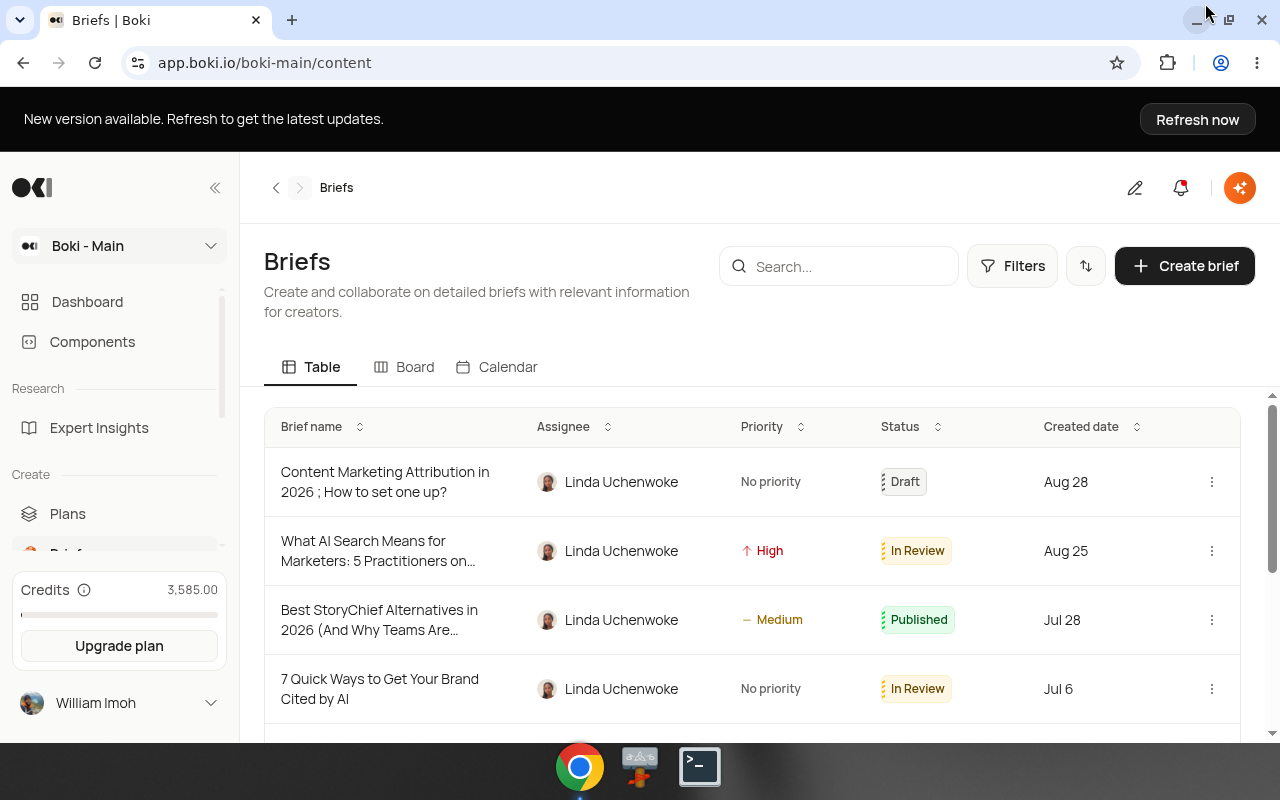
Table: List view with sortable columns. Good for seeing all briefs at once. Supports inline editing for workflow stage, priority, and assignee.
Board: Kanban-style view. Columns by status (Draft, In Progress, Complete). Drag briefs between columns.
Calendar: Date-based view. Briefs appear on their due dates. Good for editorial calendars. Hover over any date to reveal a quick-add button for creating a new brief on that day.
Access views from the view selector at the top of the Briefs page.
View promotion and distribution status
When a promotion exists for a brief, the brief shows a View promotion control. Click it to open the linked promotion directly without navigating to Publish → Promotions.
Briefs also display their distribution status, making it easier to see where a piece is in the pipeline at a glance.
Creating an article from a brief
When your brief is complete:
- Open the brief
- Click Create article
- The article editor opens with brief context loaded
Boki can reference your brief while you write.
Managing briefs
Edit a brief
- Find the brief in the list
- Click to open
- Make changes
- Changes save automatically
Delete a brief
- Open the brief
- Click the menu (three dots)
- Select Delete
Move to a different plan
- Open the brief
- Change the Plan field
- The brief moves to the new plan
Public briefs
Share a brief externally via a public link. Public briefs display:
- Assignment details (who's responsible, due dates)
- Links and references
- Target keywords
- CTAs and goals
- Attachments
Recipients see a clean, readable view of the brief without needing a Boki account.
Best practices
Be specific: "How to implement rate limiting in Node.js" beats "API article."
Include research: Briefs with sources produce better articles.
Set word counts: Gives you a target to write toward.
Use the board view: Great for tracking brief status across a team.
Related
- Plans — Organize briefs in plans
- Articles — Write from briefs
- Create your first article — Tutorial